I was working on a client's project, and they wanted paginations all over the project, since the volume of data that we were working with was huge.
So I thought of creating Pagination in LWC and reuse it.
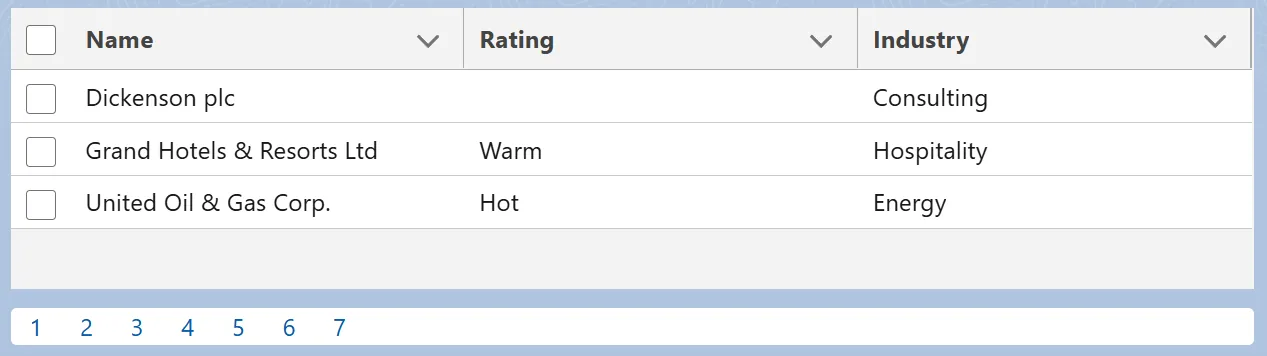
Pagination in LWC
It turned out to be a great lifesaver, also the rendering of data was super fast!
Please check the code here!
I'm starting with the template file.
<template>
    <div style="height: 150px;">
        <lightning-datatable key-field="id" data={contacts} columns={columns}>
        </lightning-datatable>
    </div>

    <div class="customPagination">
        <template for:each={paginationRange} for:item="pageNumber">
            <a
                onclick={handlePaginationClick}
                key={pageNumber}
                data-target-number={pageNumber}
                >{pageNumber}</a
            >
        </template>
    </div>
</template>
Then comes the JS file where we have all the logic in place.
import { LightningElement, track } from 'lwc';

import getAccounts from '@salesforce/apex/explorePaginationController.getAccounts';
import getAccountsCount from '@salesforce/apex/explorePaginationController.getAccountsCount';

const columns = [
    { label: 'Name', fieldName: 'Name' },
    { label: 'Rating', fieldName: 'Rating' },
    { label: 'Industry', fieldName: 'Industry' }
];

export default class ExplorePagination extends LightningElement {
    @track contacts = [];
    @track columns = columns;

    @track paginationRange = [];

    @track totalRecords;

    constructor() {
        super();
        getAccountsCount().then(count => {
            if (count) {

                //get the total count of records
                this.totalRecords = count;

                getAccounts().then(data => {
                    let i = 1;

                    this.contacts = data;

                    //looking at displaying 3 recrods per page
                    const paginationNumbers = Math.ceil(this.totalRecords / 3);

                    //create an array with size equals to paginationNumbers
                    while (
                        this.paginationRange.push(i++) < paginationNumbers
                        // eslint-disable-next-line no-empty
                    ) {}
                });
            }
        });
    }

    handlePaginationClick(event) {
        let offsetNumber = event.target.dataset.targetNumber;

        //reduce 1 from the clciked number and multiply it with 3,
        //since we are showing 3 records per page and pass the offset to apex class
        getAccounts({ offsetRange: 3 * (offsetNumber - 1) })
            .then(data => {
                this.contacts = data;
            })
            .catch(error => {
                // eslint-disable-next-line no-console
                console.log(error);
            });
    }
}
And here is the CSS file. Used it to add a little bit of custom styling.
.customPagination {
    margin-top: 10px;
    background-color: white;
    border-radius: 3px;
}

.customPagination>a {
    padding: 5px 10px;
}
And finally, the apex class.
//saving the file with .java extension for better indentation

public with sharing class explorePaginationController {

    public explorePaginationController() {
    }

    @AuraEnabled(cacheable=true)
    public static Integer getAccountsCount(){

        return [SELECT COUNT() FROM Account];
    }

    @AuraEnabled(cacheable=true)
    public static List<Account> getAccounts(Integer offsetRange){
        if(offsetRange == null){
            return [SELECT Id, Name, Rating, Industry FROM Account LIMIT 3];

        }else{
            return [SELECT Id, Name, Rating, Industry FROM Account LIMIT 3 OFFSET :offsetRange];
        }
    }

}
That is it all!
In case you implemented using some other logic, feel free to comment. Would love to check it out.
Liked the post? Let me know what you think of it.
Also check
Learn it by building it
Every course, every code repository, the discussion group and certificates of completion — one subscription.