In case you are in need of a custom lookup in LWC, it becomes tricky to implement.
We need to send a request including the search text that user is trying to perform the search with. Get the data and display it back.
Until here it's going to be fine, but the UI that we get to see when user picks one option and getting rid of the selected option when close icon is clicked. Figuring out these things can be a little bit painful.
This is what am I mean!
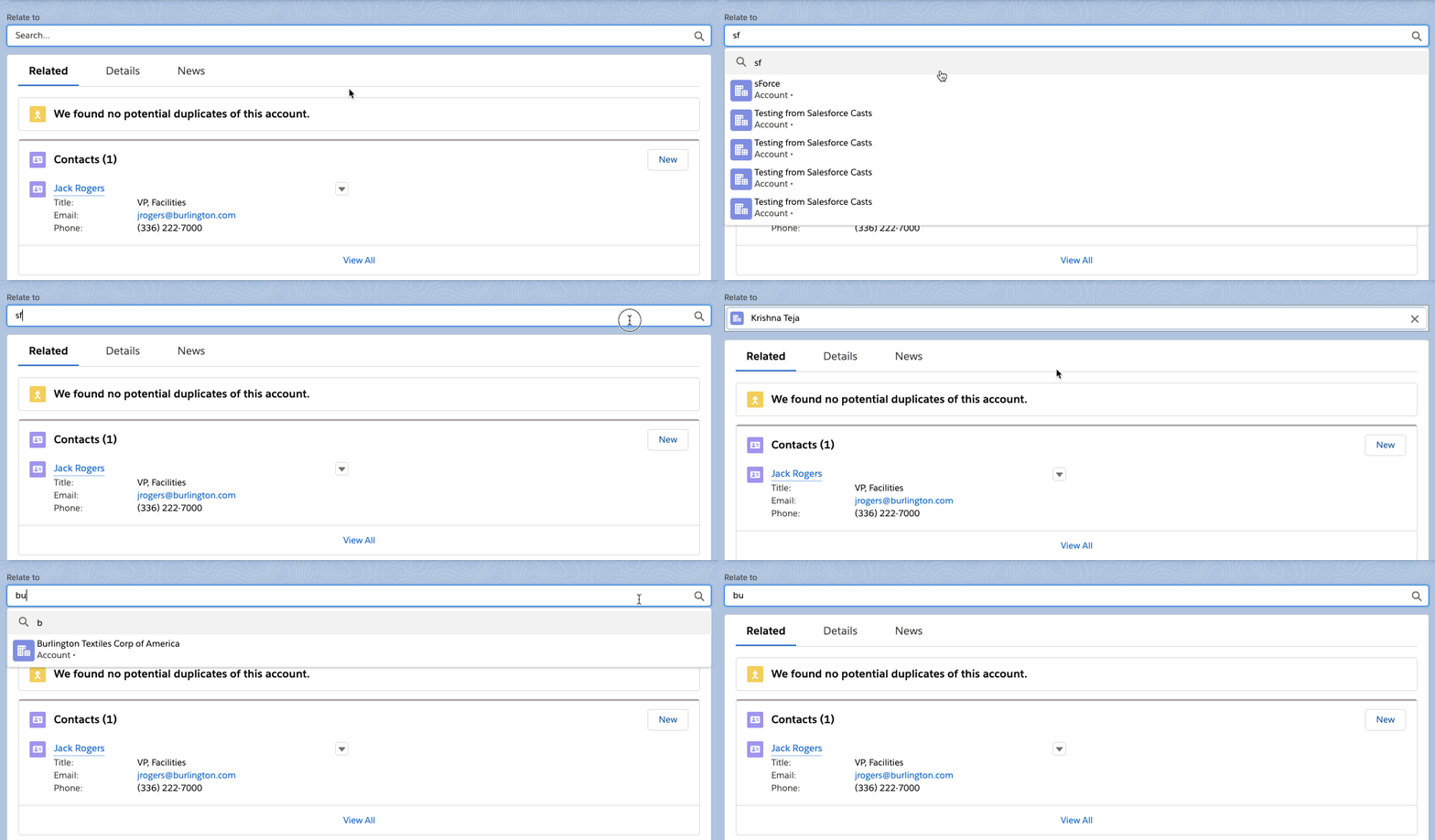
I tried building a search component which is basically a custom lookup in LWC and it searches across Account object, however, you can extend it to perform a search across any object. The results will be displayed in custom lookup search UI.
You will be able to remove the selected option and reselect another option and everything remain intact., fully in sync with the standard Lightning UI.
Let's jump into the code!
Here is the template file.
<template>
<div class="slds-form-element">
<label class="slds-form-element__label" for="combobox-id-3"
>Relate to</label
>
<div class="slds-form-element__control">
<div class="slds-combobox_container">
<div
class="slds-combobox slds-dropdown-trigger slds-dropdown-trigger_click slds-is-open"
aria-expanded="false"
aria-haspopup="listbox"
role="combobox"
>
<div
class="slds-combobox__form-element slds-input-has-icon slds-input-has-icon_right"
role="none"
>
<!-- hide this by default-->
<div class="selectedOption slds-hide">
<span
class="slds-icon_container slds-icon-standard-account slds-combobox__input-entity-icon"
title="Account"
>
<lightning-icon
icon-name="standard:account"
alternative-text="account"
size="x-small"
></lightning-icon>
<span class="slds-assistive-text">Account</span>
</span>
<input
type="text"
class="slds-input slds-combobox__input slds-combobox__input-value search-result_left-pad"
id="combobox-id-5"
aria-controls="listbox-id-5"
autocomplete="off"
role="textbox"
placeholder="Select an Option"
readonly=""
value={selectedAccount}
/>
<button
class="slds-button slds-button_icon slds-input__icon slds-input__icon_right"
title="Remove selected option"
>
<lightning-icon
icon-name="utility:close"
alternative-text="close"
size="x-small"
onclick={handleRemoveSelectedOption}
></lightning-icon>
<span class="slds-assistive-text"
>Remove selected option</span
>
</button>
</div>
<!-- end hide this by default-->
<div class="defaultClass">
<input
type="text"
class="slds-input slds-combobox__input slds-has-focus"
id="combobox-id-3"
aria-activedescendant="option1"
aria-autocomplete="list"
aria-controls="listbox-id-3"
autocomplete="off"
role="textbox"
placeholder="Search..."
onkeyup={handleKeyUp}
value={search}
/>
<span
class="slds-icon_container slds-icon-utility-search slds-input__icon slds-input__icon_right"
>
<lightning-icon
icon-name="utility:search"
alternative-text="Approved"
size="x-small"
></lightning-icon>
</span>
</div>
</div>
<div
id="listbox-id-3"
class="slds-dropdown slds-dropdown_length-with-icon-7 slds-dropdown_fluid accounts_list slds-hide"
role="listbox"
>
<ul
class="slds-listbox slds-listbox_vertical"
role="presentation"
>
<li role="presentation" class="slds-listbox__item">
<div
aria-selected="true"
id="option0"
class="slds-media slds-listbox__option slds-listbox__option_entity slds-listbox__option_term slds-has-focus"
role="option"
>
<span
class="slds-media__figure slds-listbox__option-icon"
>
<span
class="slds-icon_container slds-icon-utility-search"
title="Search for term: "
>
<lightning-icon
icon-name="utility:search"
alternative-text="search"
size="x-small"
></lightning-icon>
<span class="slds-assistive-text"
>Search for term:
</span>
</span>
</span>
<span class="slds-media__body">
<span
class="slds-listbox__option-text slds-listbox__option-text_entity"
>{search}</span
>
</span>
</div>
</li>
<template
for:each={accounts.data}
for:item="account"
>
<li
role="presentation"
class="slds-listbox__item"
key={account.Id}
onclick={handleOptionSelect}
data-id={account.Id}
data-name={account.Name}
>
<div
aria-selected="true"
id={account.Id}
class="slds-media slds-listbox__option slds-listbox__option_entity slds-listbox__option_has-meta"
role="option"
tabindex="0"
>
<span
class="slds-media__figure slds-listbox__option-icon"
>
<span
class="slds-icon_container slds-icon-standard-account"
>
<lightning-icon
icon-name="standard:account"
alternative-text="Account"
small="x-small"
></lightning-icon>
</span>
</span>
<span class="slds-media__body">
<span
class="slds-listbox__option-text slds-listbox__option-text_entity"
>{account.Name}</span
>
<span
class="slds-listbox__option-meta slds-listbox__option-meta_entity"
>Account •
{account.Number}</span
>
</span>
</div>
</li>
</template>
</ul>
</div>
</div>
</div>
</div>
</div>
</template>
This is going to be the JS file
import { LightningElement, track, wire } from 'lwc';

import getAccounts from '@salesforce/apex/ExploreCustomAccountController.getAccounts';
const DELAY = 300;

export default class ExploreAccountLookup extends LightningElement {
    @track search = '';
    @track error;

    @track selectedAccount;
    @track showAccountsListFlag = false;

    @wire(getAccounts, { searchText: '$search' })
    accounts;

    handleKeyUp(event) {
        if (!this.showAccountsListFlag) {

            this.showAccountsListFlag = true;
            this.template
                .querySelector('.accounts_list')
                .classList.remove('slds-hide');
        }
        window.clearTimeout(this.delayTimeout);
        const searchKey = event.target.value;
        // eslint-disable-next-line @lwc/lwc/no-async-operation
        this.delayTimeout = setTimeout(() => {
            this.search = searchKey;
        }, DELAY);
    }

    handleOptionSelect(event) {
        this.selectedAccount = event.currentTarget.dataset.name;
        this.template
            .querySelector('.selectedOption')
            .classList.remove('slds-hide');
        this.template
            .querySelector('.accounts_list')
            .classList.add('slds-hide');
        this.template
            .querySelector('.slds-combobox__form-element')
            .classList.add('slds-input-has-border_padding');
    }

    handleRemoveSelectedOption() {
        this.template
            .querySelector('.selectedOption')
            .classList.add('slds-hide');
        this.template
            .querySelector('.slds-combobox__form-element')
            .classList.remove('slds-input-has-border_padding');

        this.showAccountsListFlag = false;
    }
}
And here is a little bit of custom CSS that we would need to keep things together.
.selectedOption {
    width: 99.5%;
    position: absolute;
    z-index: 10;
}

.targetOption {
    position: relative;
}

.search-result_left-pad {
    padding-left: 35px !important;
}

.slds-input-has-border_padding {
    border: 1px solid grey;
    padding: 3px;
    background: white;
}
Liked the post? Let me know what you think of it.
Learn it by building it
Every course, every code repository, the discussion group and certificates of completion — one subscription.