I will walk you through the process of building a component that's used to create records and also edit records from the list of available records using the minimum code possible.
There might be umpteen number of ways to implement it, but I choose this approach only to make sure that I build it with minimum no of lines of code.
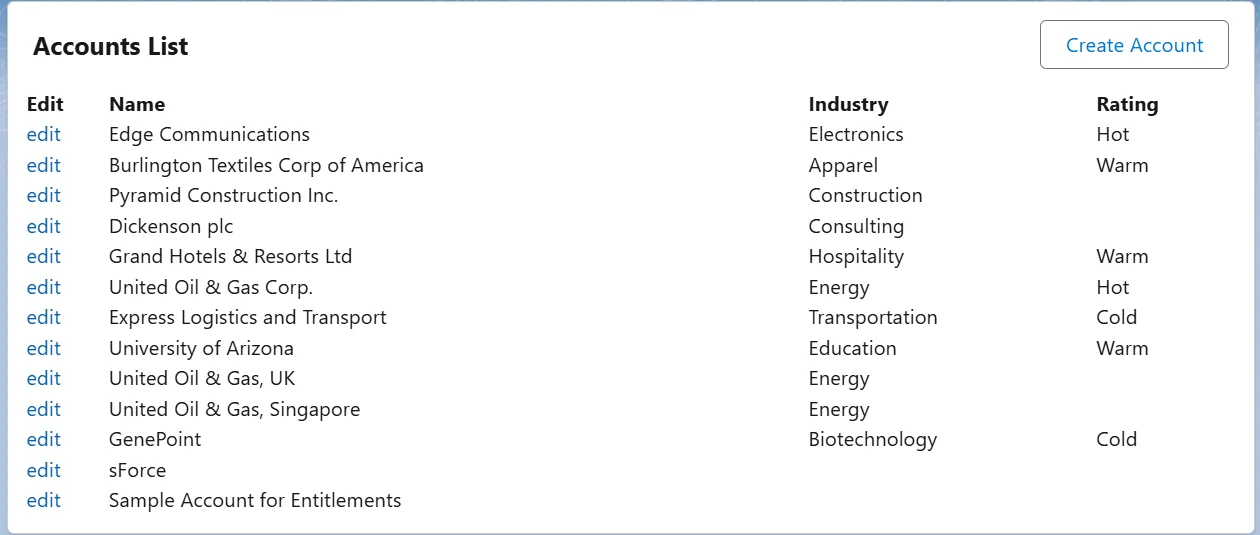
Custom Account Handler built with Aura Component
Let's get started!
<aura:component implements="force:appHostable" controller="AccountsController">
    <aura:handler name="init" value="{! this }" action="{! c.doInit }"/>

    <!-- this is to refresh the list once the record is saved! -->
    <aura:handler event="force:showToast" action="{! c.doInit }" />

    <aura:attribute name="accountsData" type="Account[]" />
    <aura:attribute name="newRec" type="boolean" default="false" />
    <aura:attribute name="showList" type="boolean" default="true" />

    <aura:if isTrue="{!v.showList}">
        <lightning:card title="Accounts List">
            <aura:set attribute="actions">
                <lightning:button label="Create Account" onclick="{! c.handleCreate }" />
            </aura:set>
            <p class="slds-p-horizontal_small">
                <table>
                    <tr>
                        <th>Edit</th>
                        <th>Name</th>
                        <th>Industry</th>
                        <th>Rating</th>
                    </tr>
                    <aura:iteration items="{! v.accountsData }" var="item">
                        <tr>

                            <td>
                                <a data-record="{! item.Id }" onclick="{! c.handleEdit }">edit</a>
                            </td>
                            <td>
                                {! item.Name }
                            </td>
                            <td>
                                {! item.Industry }
                            </td>
                            <td>
                                {! item.Rating }
                            </td>
                        </tr>
                    </aura:iteration>
                </table>
            </p>

        </lightning:card>
    </aura:if>
    <aura:if isTrue="{!v.newRec}">
        <lightning:card title="New Account" class="slds-var-m-around_xx-large slds-var-p-around_xx-large">
            <lightning:recordEditForm
                                      onsuccess="{!c.handleShowList}"
                                      objectApiName="Account">
                <!-- the messages component is for error messages -->
                <lightning:messages />

                <lightning:inputField fieldName="Name" />
                 <lightning:inputField fieldName="Industry" />
                 <lightning:inputField fieldName="Rating" />

                <div class="slds-m-top_medium">
                    <lightning:button variant="brand" type="submit" name="save" label="Save" />
                </div>
            </lightning:recordEditForm>
        </lightning:card>
    </aura:if>


</aura:component>
Here comes the controller.js file
({
    doInit : function(component, event, helper){
        helper.fetchAllAccountsUtil(component);
    },
    handleCreate : function(component, event, helper) {
        component.set( 'v.newRec', true);
        component.set( 'v.showList', false);
    },

    handleEdit : function(component, event, helper) {
        var selectedItem = event.currentTarget;
        var recId = selectedItem.dataset.record;

        var editRecordEvent = $A.get("e.force:editRecord");
        editRecordEvent.setParams({
            "recordId": recId
        });
        editRecordEvent.fire();


    },
    handleShowList : function(component, event, helper){
        component.set( 'v.newRec', false);
        component.set( 'v.showList', true);
        helper.fetchAllAccountsUtil(component);
    }
})
This is the helper/util class
({
	fetchAllAccountsUtil : function(component) {
	var action = component.get("c.getAccounts");

        action.setCallback(this, function(response) {
            var state = response.getState();
            if (state === "SUCCESS") {
                var returnValue = response.getReturnValue();
                component.set( 'v.accountsData', returnValue);
                console.log(returnValue);
            }
            else if (state === "INCOMPLETE") {

            }
                else if (state === "ERROR") {
                    var errors = response.getError();
                    if (errors) {
                        if (errors[0] && errors[0].message) {
                            console.log("Error message: " + errors[0].message);
                        }
                    } else {
                        console.log("Unknown error");
                    }
                }
        });


        $A.enqueueAction(action);
	}
})
Here is the Apex Class
public class AccountsController {
    @AuraEnabled
    public static List<Account> getAccounts(){
        return [SELECT Id, Name, Industry, Rating FROM Account];
    }
}
Feel free to let me know in case you know any other approach that’s even more simple than this.
You can also do it using standard out of the box events which are namely e.force:editRecord and e.force:recordSave but refreshing the list after updating/creating nay record remains a challenge. Hence I opted for this approach.
Learn it by building it
Every course, every code repository, the discussion group and certificates of completion — one subscription.