When we work with an object that has multiple fields, it’s a suggested practice that we split the form into multiple screens.
Let's say we have 150 fields in an object, in that case it’s a better practice to show 10 fields per screen, which boils down to 15 screens.
Let's look at how to implement a form wizard which is nothing but a form with multiple steps in LWC. We will also be using LDS for this reusable component.
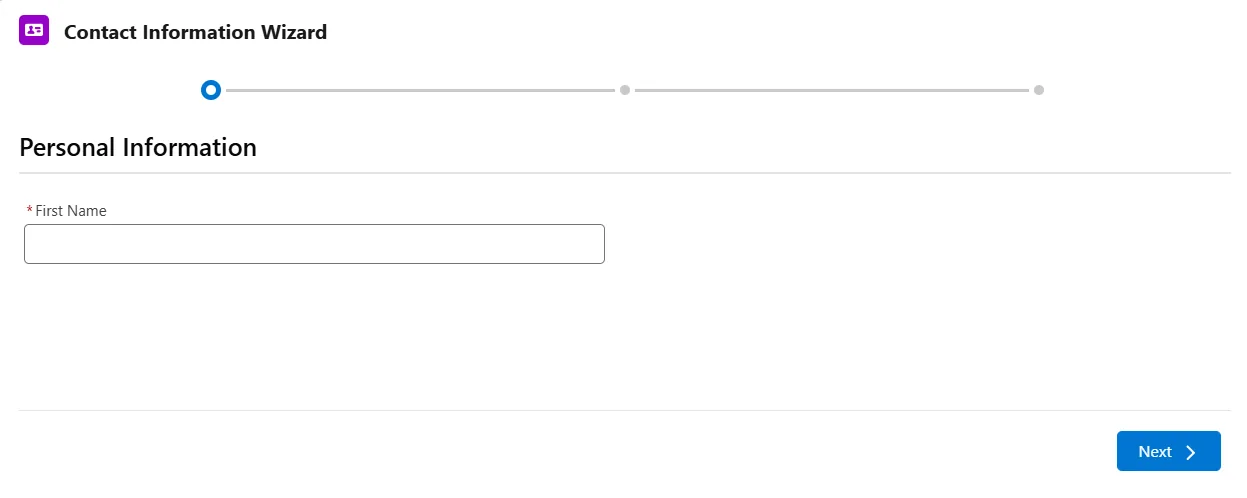
Form With Multiple Steps built in LWC
We already looked at how to implement it in Aura Components and in case you are interested you can check it here.
This is how the template file is going to look like.
<template>
    <lightning-progress-indicator
        current-step={currentStep}
        type="base"
        variant="base"
    >
        <lightning-progress-step
            label="Step 1"
            value="1"
        ></lightning-progress-step>
        <lightning-progress-step
            label="Step 2"
            value="2"
        ></lightning-progress-step>
        <lightning-progress-step
            label="Step 3"
            value="3"
        ></lightning-progress-step>
    </lightning-progress-indicator>

    <lightning-record-edit-form object-api-name="Contact">
        <lightning-messages> </lightning-messages>
        <div class="stepOne">
            <lightning-input-field field-name="FirstName">
            </lightning-input-field>
            <lightning-button
                class="slds-m-top_small"
                label="Next"
                onclick={goToStepTwo}
            ></lightning-button>
        </div>
        <div class="stepTwo slds-hide">
            <lightning-input-field field-name="LastName">
            </lightning-input-field>
            <lightning-button
                class="slds-m-top_small"
                label="Previous"
                onclick={goBackToStepOne}
            ></lightning-button>
            <lightning-button
                class="slds-m-top_small"
                label="Next"
                onclick={goToStepThree}
            ></lightning-button>
        </div>
        <div class="stepThree slds-hide">
            <lightning-input-field field-name="Email"> </lightning-input-field>
            <lightning-button
                class="slds-m-top_small"
                label="Previous"
                onclick={goBackToStepTwo}
            ></lightning-button>
            <lightning-button
                class="slds-m-top_small"
                label="Save"
                type="submit"
                onclick={handleSave}
            ></lightning-button>
        </div>
    </lightning-record-edit-form>
</template>
This is the controller file supporting the web component.
import { LightningElement, api, track } from 'lwc';

export default class ExploreFormWizard extends LightningElement {
    @api recordId;
    @track currentStep;

    goBackToStepOne() {
        this.currentStep = '1';

        this.template.querySelector('div.stepTwo').classList.add('slds-hide');
        this.template
            .querySelector('div.stepOne')
            .classList.remove('slds-hide');
    }

    goToStepTwo() {
        this.currentStep = '2';

        this.template.querySelector('div.stepOne').classList.add('slds-hide');
        this.template
            .querySelector('div.stepTwo')
            .classList.remove('slds-hide');
    }
    goBackToStepTwo() {
        this.currentStep = '2';

        this.template.querySelector('div.stepThree').classList.add('slds-hide');
        this.template
            .querySelector('div.stepTwo')
            .classList.remove('slds-hide');
    }
    goToStepThree() {
        this.currentStep = '3';

        this.template.querySelector('div.stepTwo').classList.add('slds-hide');
        this.template
            .querySelector('div.stepThree')
            .classList.remove('slds-hide');
    }
}
Also notice the attribute current-step={currentStep} associated with the tag <lightning-progress-indicator, currentStep is a property and the value assigned to it is not an Integer its string, so remember to wrap the number with single/double quotes.
Liked the post? Let me know what you think of it.
Hope this was helpful!
Learn it by building it
Every course, every code repository, the discussion group and certificates of completion — one subscription.